Choosing the right professional tax software is one of the most important decisions you’ll make for your tax business. The right solution should do more than prepare accurate returns—it should help your firm streamline workflows, manage increasing return volumes, support multiple office locations, enhance client communication, and adapt as your business grows.
Whether you’re an independent tax preparer, an enrolled agent, or managing a multi-location tax firm, evaluating your software carefully can improve efficiency, reduce administrative work, and position your business for long-term success.
In this guide, we’ll cover the essential features every tax professional should look for and explain how modern solutions like CrossLink® help firms stay productive throughout tax season and beyond.
At a Glance: What Should Professional Tax Software Include?
When comparing professional tax software, prioritize solutions that offer:
| Feature | Why It Matters |
| Comprehensive federal and state forms | Supports a wide range of client needs without additional software. |
| Desktop and cloud-based options | Gives firms flexibility based on their workflow and office structure. |
| Tax return management tools | Keeps returns organized from preparation through e-file acceptance. |
| Built-in compliance updates | Helps ensure returns reflect current IRS and state tax law changes. |
| Secure client communication | Simplifies document collection, signatures, and collaboration. |
| Multi-location management | Makes it easier to oversee multiple offices and preparers. |
| Workflow visibility | Allows managers to monitor return status and staff productivity. |
| Third-party integrations | Connects your tax software with the other tools your business relies on. |
| Responsive customer support | Provides assistance when you need it most during tax season. |
What Is Professional Tax Software?
Professional tax software is designed specifically for paid tax professionals, enrolled agents, CPAs, accountants, and tax firms preparing returns on behalf of clients.
Unlike consumer tax software, professional platforms provide advanced capabilities such as:
- Federal and state tax return preparation
- Business and individual return support
- Electronic filing
- Tax return management
- Multi-user access
- Firm reporting
- Client document management
- Compliance updates
- Productivity tools
- Integrations with other business applications
The right software becomes the operational hub of your practice, helping your team prepare returns efficiently while maintaining accuracy and compliance.
1. Comprehensive Form Support Is Essential
Every tax practice serves clients with different filing needs.
Your software should support a broad range of federal and state forms, including:
- Individual (1040)
- Partnerships
- S Corporations
- C Corporations
- Estates and Trusts
- Nonprofits
CrossLink supports more than 4,300 federal and state forms, giving tax professionals the flexibility to prepare a wide variety of returns from a single platform.
2. Choose Software That Fits Your Firm’s Workflow
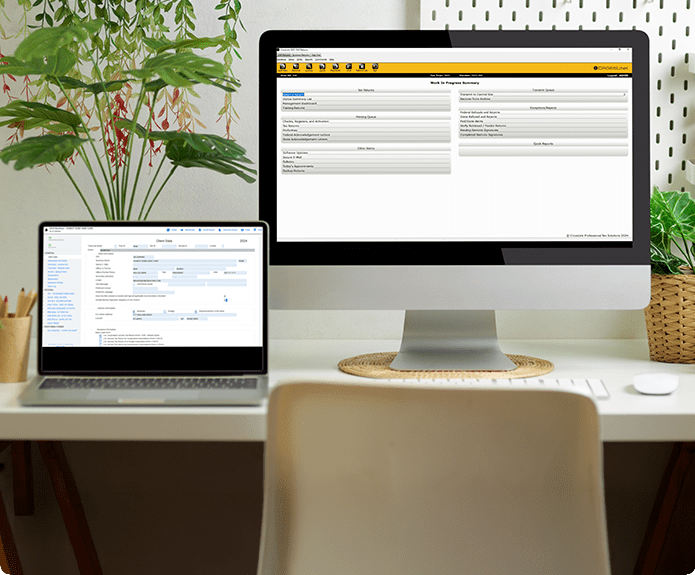
Every tax office operates differently.
Some firms prefer locally installed desktop software, while others need the flexibility of cloud-based access for multiple offices or remote preparers.
CrossLink offers both:
- CrossLink 1040 Desktop
- CrossLink 1040 Online
- CrossLink 1040 Desktop Hosted
- CrossLink Business Desktop
- CrossLink Business Online
- CrossLink Business Desktop Hosted
This flexibility allows firms to choose the environment that best fits their operational needs without sacrificing functionality.
3. Look for Built-In Tax Return Management Tools
Preparing returns is only one part of running a successful tax office.
Efficient tax return management helps your team:
- Monitor return progress
- Track e-file acknowledgments
- Organize client information
- Identify bottlenecks
- Keep work moving during peak filing season
CrossLink includes tools such as the Work-in-Progress Dashboard, giving firms greater visibility into return status throughout the preparation process.
4. Accuracy Features Save Time
Even experienced tax professionals occasionally encounter errors or inconsistencies during return preparation.
The best professional tax software helps identify issues before filing.
CrossLink includes Point-and-Shoot Error Correction, allowing preparers to quickly navigate directly to fields requiring attention instead of manually searching through an entire return.
Features that simplify error correction can significantly reduce review time during busy filing periods.
5. OCR Technology Can Improve Efficiency

Manual data entry remains one of the most time-consuming parts of tax preparation.
Modern tax software increasingly incorporates optical character recognition (OCR) technology to reduce repetitive entry.
CrossLink’s Agent Intelligence helps import taxpayer information from source documents, reducing manual entry while improving preparation efficiency.
For firms preparing hundreds or thousands of returns each season, small time savings per return can add up quickly.
6. Built-In Tax Compliance Tools Matter
Federal and state tax laws evolve every year.
Reliable tax compliance tools help firms stay current by incorporating:
- IRS updates
- State tax law changes
- Form revisions
- Filing requirements
Keeping software current helps minimize filing delays and reduces the likelihood of rejected returns.
7. Client Communication Should Be Easy
Today’s taxpayers expect digital convenience.
Professional tax software should simplify communication while helping protect sensitive taxpayer information.
CrossLink provides several tools designed to improve the client experience:
TaxPass Mobile Taxpayer Solution
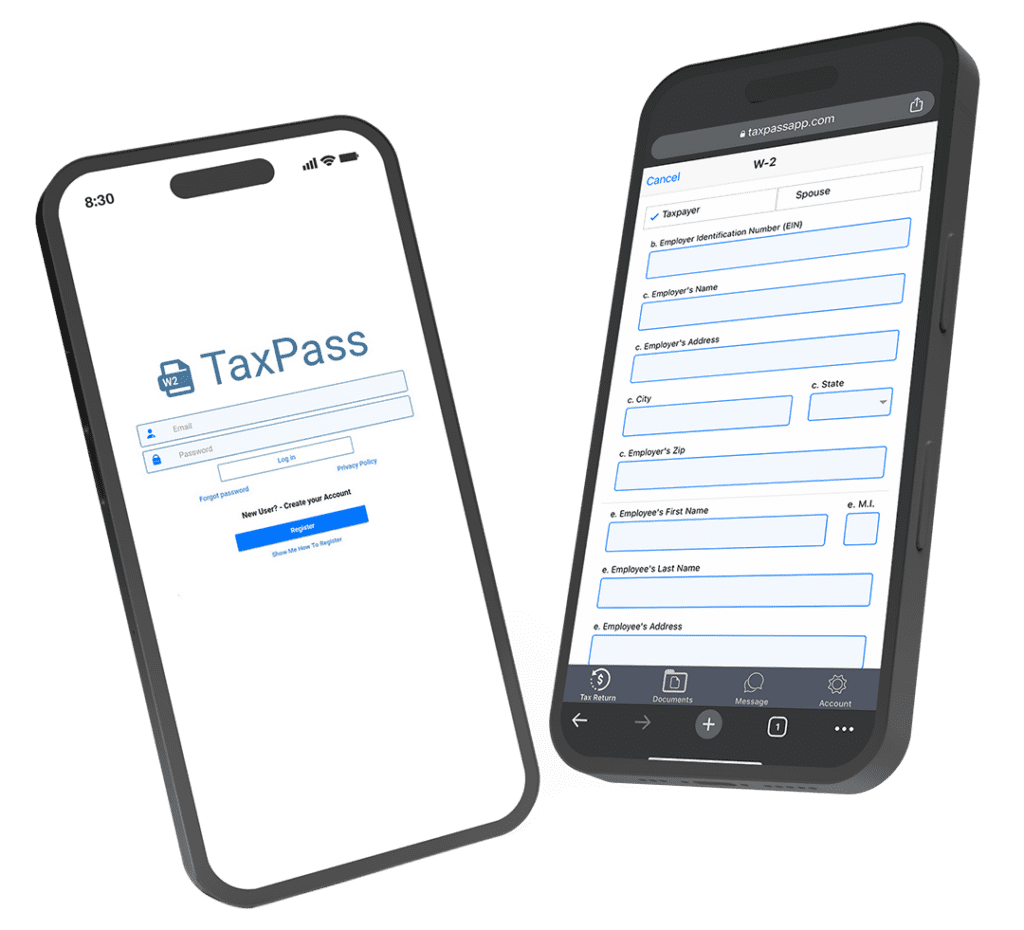
TaxPass allows clients to securely:
- Upload documents
- Complete tax organizers
- Communicate with their preparer
- Receive notifications
Remote Signature
Remote Signature allows taxpayers to electronically sign eligible documents without visiting the office, helping firms reduce paperwork and improve turnaround times.
TextLink Plus
TextLink Plus provides another convenient communication option, helping firms stay connected with clients throughout the tax preparation process – all from within the CrossLink software. You can also message clients individually or create batch messages to several clients at once.
Document Archive
Document Archive helps firms securely organize and access client documents when needed. The CrossLink Document Archive stores documents within the client’s return in the CrossLink software, so there is no need to jump between multiple programs or import documents from a separate client portal.
8. Management Visibility Becomes More Important as Firms Grow
As return volume increases, firm owners need visibility into operations.
CrossLink’s Management Dashboard provides reporting tools that help firms monitor production and performance for multiple offices, making it easier to oversee staff and identify workflow opportunities.
Managers can make more informed decisions when they have access to real-time operational data.
9. Multi-Location Tax Software Should Simplify Growth
Expanding to multiple offices introduces additional operational complexity.
The right multi-location tax software should help firms:
- Standardize processes
- Support multiple preparers
- Monitor office performance
- Manage returns consistently across locations
CrossLink’s desktop and online solutions are designed to support firms ranging from single-office practices to large multi-office organizations.
10. Integrations Help Your Technology Work Together
Modern tax firms use multiple software platforms.
Choosing software that integrates with other business tools can reduce duplicate work and improve efficiency.
CrossLink offers integrations including:
- Zapier – allowing you to connect CrossLink with thousands of applications to sync data, organize client information, and streamline communications across platforms.
- Bank Product Solutions – for Refund Transfer (RT) and Refund Settlement services
- PayJunction – for payment processing and remote invoicing
- TheTaxBook WebLibrary
These integrations allow firms to streamline workflows and extend the capabilities of their tax software.
11. Consider Features That Save Time Every Day
While major capabilities often receive the most attention, smaller productivity tools can have a significant impact over the course of tax season.
CrossLink includes numerous features designed to improve day-to-day efficiency, including:
- Verify system
- Appointment Calendar
- Filing Status Optimization
- Multi-Year Comparison Reports
- Pre-Season Letters and Organizers
- Customer Portal
- Fixed Asset Reports
- Multiple IRS transmissions throughout the day
- Free data conversion for qualifying customers
- Multiple preparers
These tools help reduce administrative work while improving the overall experience for both tax professionals and their clients.
12. Don’t Overlook Support and Onboarding
Even experienced firms occasionally need assistance.
When evaluating tax preparation software, ask questions like:
- Is onboarding available?
- Is technical support offered during tax season?
- Are software updates included?
- Are educational resources available?
Strong support can reduce downtime and help firms get the most from their software investment. CrossLink offers an extended library of online training resources plus 100% U.S. based technical support, onboarding, and training for before, during, and after tax season.
Why CrossLink Professional Tax Software Stands Out
Choosing tax software isn’t just about preparing returns—it’s about selecting a technology partner that supports your firm’s growth.
CrossLink combines decades of industry experience with tools designed specifically for professional tax preparers.
Highlights include:
- Desktop and online solutions
- More than 4,300 federal and state forms
- Individual and business return preparation
- Point-and-Shoot Error Correction™
- CrossLink Agent Intelligence OCR
- Work-in-Progress Dashboard
- Management Dashboard for multi-office management
- TaxPass Mobile Taxpayer Solution
- Remote Signature
- TextLink Plus for client communication
- Document Archive digital client document storage
- Zapier and PayJunction integrations
- Bank Product Solution integrations for Refund Transfer (RT) and Refund Settlement services
- Verify system
- Multiple IRS transmissions daily
- Free data conversion
- Unlimited preparers
- Audit Allies audit assistance
- iPROTECT identity monitoring service
Whether you’re an independent preparer, an enrolled agent, or managing multiple offices, CrossLink offers the flexibility and tools needed to help your firm work more efficiently.
Frequently Asked Questions
What is professional tax software?
Professional tax software is designed for paid tax professionals and firms preparing tax returns for clients. It typically includes advanced tax preparation, e-file capabilities, tax return management, reporting, compliance updates, and productivity tools.
What should I look for in tax preparation software?
Look for comprehensive form support, compliance updates, efficient tax return management, secure client communication, digital document storage, reporting tools, integrations, and software that can grow with your business.
What is the best tax software for enrolled agents?
The best tax software for enrolled agents supports both individual and business returns, provides current IRS updates, simplifies client management, and offers reliable technical support during tax season.
What is the best tax software for small firms?
When evaluating tax software for small firms, prioritize solutions that are easy to implement, scalable, and equipped with professional-grade features that support future growth.
Why is tax return management important?
Effective tax return management helps firms organize returns, monitor preparation status, improve workflow visibility, and reduce administrative time during peak filing periods.
What are tax compliance tools?
Tax compliance tools help tax professionals stay current with changing IRS and state regulations by providing updated forms, calculations, and filing requirements.
What should multi-location tax firms look for?
Growing firms should choose multi-location tax software that supports multiple preparers, provides centralized reporting, standardizes workflows, and offers flexible desktop or online deployment options.
Ready to Find the Right Professional Tax Software?
The right software can help your firm prepare returns more efficiently, improve client communication, simplify workflow management, and support long-term growth.
As you evaluate your options, look beyond basic tax preparation features and consider how your software will support your team, your clients, and your business for years to come. CrossLink delivers a comprehensive suite of professional tax solutions designed to help tax professionals prepare returns with confidence while providing the flexibility, productivity, and support today’s firms need to grow and succeed.